


LEARN
pliability

Maybe you want to squat without your heels lifting, run without your hips complaining, or just get up from your desk without creaking. The best mobility app turns that intention into a habit: guided mobility exercises on your phone, programmed by people who understand movement, ready whenever you have ten minutes.
The category is crowded, and the apps in it work very differently. Full disclosure: we make one of the apps on this list, so we know the category from the inside, and we would rather you pick the right tool than the loudest one. Below: the four pillars that separate a great mobility app from an abandoned subscription, a side-by-side comparison, honest reviews of all 12 picks, and a sample daily routine you can run tonight, app or no app.
what makes a great mobility app
Every app here gets judged on the same four pillars. They are the difference between a tool that changes how you move and a subscription you forget about.
Exercise library depth. A serious mobility app covers every body area that gets tight, hips, spine, shoulders, neck, wrists, ankles, and feet, with a mix of passive holds, active range work, and dynamic warm-up movements. A shallow library means you plateau in a month. pliability's video library spans all of those areas across passive, active, isometric, and dynamic styles, which is the standard we hold every pick to.
Personalization. Generic playlists get skipped. The good apps shape the work around you: pliability does it through Daily Sessions, multi-week Paths toward a specific goal, and Build Your Program for a plan around your own training. Other apps here do it through custom coaching or adaptive session generators.
Mobility assessment. You cannot fix what you have not measured. The strongest apps assess your range first and program against your actual restrictions. pliability's mobility assessment uses a Lidar body scan to pinpoint where you are tight; GOWOD and The Ready State run their own assessment-driven programming, and we credit them for it below.
Integration with your training data. Mobility work lands hardest when it responds to what you actually did today. pliability's integration recommendations adapt sessions to your wearable and training data, so a hard session is followed by the recovery your body is asking for rather than a generic flow.
One more rule we hold ourselves to: descriptions below stick to what each app documents about itself, and pricing is described structurally, free tier, subscription, one-time purchase, trial length, because rates change faster than articles do. Check each store listing for current numbers.
mobility app vs. mobility program
You will see both terms used, often interchangeably. The program is the substance: the set of exercises and how they progress over time. The app is the delivery. Every good mobility app contains a mobility program, and a few of the best mobility programs skip the app store entirely and run in your browser. We include both kinds below, so a program without a native app can still earn its spot.
how the best mobility apps compare
The full reviews follow, but here is how the leading picks stack up on the four pillars.
pliability: full library across every body area; mobility assessment via Lidar body scan; integration recommendations from wearable and training data; subscription with a 7-day free trial.
GOWOD: the most generous free plan in the category; its own mobility assessment and personalized programming on premium; built around CrossFit-style training; free tier plus premium subscription.
The Ready State: physiotherapy-grounded library with a dedicated pain relief section; an assessment generates your routine; standalone programming rather than training-data integration; subscription with an annual discount.
Down Dog: yoga-first sessions generated from more than 60,000 configurations; no assessment, personalization comes from your own settings; free to start, subscription for full access.
StretchIt: flexibility-milestone programs with progress photos; no formal assessment; free trial, then subscription.
Cali Move Mobility 2.0: a structured 32-week browser-based progression; no assessment, one linear program; one-time purchase with lifetime access.
the 12 best mobility apps
Each pick is summarized by what it does best. Trials and plans change, so confirm the details before you subscribe.
1. pliability: best all-around mobility app
pliability blends passive stretching, active mobility, and breathwork into guided video sessions for athletes and everyday movers. Daily Sessions anchor the practice with a fresh routine every day. Paths give you multi-week progressions toward a specific goal, like hip mobility or better sleep. Build Your Program shapes a plan around your own training, and the mobility assessment scans your body with Lidar to pinpoint your restrictions, so the work targets what is actually tight. Integration recommendations then adapt sessions to your wearable and training data, which is the training-data pillar most apps in this category skip.
It is built for consistency first: cinematic, calming, and short enough to do after every session. If you want calisthenics skill work, The Movement Athlete fits better; if you want a one-time-purchase course, look at Cali Move or VAHVA below. For a daily mobility practice that supports training and recovery, this is our lane. Plans start with a 7-day free trial on iPhone, iPad, Android, and the web.
2. Mobility Manual: best for a fully customized plan
Founded by British Olympic weightlifter Sonny Webster, Mobility Manual is the only option here that offers a plan built entirely around you: a six-week program designed from your goals, restrictions, and training history. It costs more than a typical subscription, but the support and accountability tend to produce visible results quickly. The flagship Lifter's Mobility Manual suits anyone whose training centers on the barbell, and a membership adds live classes and the full program catalog.
3. StretchIt: best for flexibility goals
StretchIt is the pick if your goal sounds like a flexibility milestone: touching your toes, front splits, a deeper backbend. Its challenges and programs chase those targets directly, with balance and coordination work mixed in and progress photos that make the change visible. User reviews are consistently strong, and a 7-day free trial lets you test it before committing to a plan.
4. VAHVA Movement 20XX: best for general movement
VAHVA's Movement 20XX is a beginner-friendly course that covers mobility alongside strength and conditioning, all without equipment. It runs on a one-time fee with lifetime access, which looks expensive up front and becomes the economical option if you stick with it for a year or two. The platform is basic compared to the slicker apps here, but the content quality holds up.
5. The Movement Athlete: best for calisthenics
Calisthenics demands serious range, and The Movement Athlete builds it into a complete bodyweight training app. An assessment maps your strengths and weaknesses, and you clear stages to progress, which keeps the experience closer to a game than a spreadsheet. It is a full fitness app rather than a dedicated mobility tool, so expect to dig a little for mobility-only content.
6. GOWOD: best free mobility app
GOWOD has long been pliability's closest competitor, with roots in the same CrossFit world. Its free plan is the most generous in the category, offering real movements and workouts rather than a locked-down teaser, and premium adds its own mobility assessment and personalized programming, which puts it ahead of most of this list on the assessment pillar. The two apps overlap enough that the choice often comes down to preference; we compared them feature by feature in GOWOD vs pliability.
7. MoveWell: best for workout-matched warm-ups
MoveWell builds mobility routines around the training you have planned, so leg day gets lower-body prep instead of a generic full-body flow. Morning sessions ease you into the day, most routines are bodyweight-only, and the basic version is free, with a subscription opening the full library. Apple devices only.
8. Cali Move Mobility 2.0: best structured long-term program
Mobility 2.0 is a 32-week progression that starts with no prerequisites and builds toward an advanced degree of mobility, balance, and endurance. It is browser-based rather than a native app, works cleanly on a phone, and pairs naturally with Cali Move's calisthenics programs. By the final level, maintenance is simply repeating the last routines.
9. Berg Movement app: best modular approach
Berg Movement sits between a calisthenics app and a mobility coach. Exercises are grouped into modules that describe exactly what they target, and you drag and drop them into your own workouts or follow the prebuilt routines. Every exercise includes follow-along HD video from Sondre Berg himself. Subscriptions come in monthly, six-month, and annual plans; current rates are on the store listing.
10. The Ready State Virtual Mobility Coach: best for beginners and pain relief
Built by Dr. Kelly Starrett, author of Becoming a Supple Leopard, the Virtual Mobility Coach is one of the most physiotherapeutically grounded options available. An assessment generates your routine, daily maintenance keeps you moving, and a dedicated pain relief section addresses specific problem areas. If you are starting from limited mobility or managing pain, start here, ideally with your clinician's sign-off. It is subscription-based, with the usual discount for going annual.
11. Primal Mobility: best for barbell athletes
Primal Mobility programs strength at the end ranges of your joints, where lifters need it most. The focus is stability, control, and power in the positions that show up under the bar, which makes it a natural fit for weightlifters, and for coaches who want to understand movement mechanics more deeply.
12. Down Dog: best yoga-style mobility sessions
Down Dog is a yoga app rather than a dedicated mobility tool, but it earns a spot because so much mobility work shares shapes with yoga. Each session is generated from more than 60,000 configurations tuned to your practice, experience, pace, and music, so no two are the same. It is free to start, with a subscription for full access. The trade-off: personalization comes from your own settings rather than an assessment, and targeted stretch-and-recover work takes some configuring inside a yoga-first structure.
a simple daily mobility routine to start tonight
A good mobility app earns its keep by programming this for you, but you do not need to wait for a download to feel what daily mobility work is like. Here is a simple sequence in the style of a pliability Daily Session: slow transitions, long holds, breath leading the way. It takes about ten minutes.
Cat-Cow, 1 minute. On all fours, alternate slowly between arching and rounding your spine, matching each shift to an inhale or exhale. This warms the spine and settles your breathing.
90/90 hip rotations, 2 minutes. Seated with both knees bent at roughly 90 degrees, rotate the knees from one side to the other with control. Active hip work that preps the deeper holds.
Pigeon Pose, 2 minutes per side. A passive hip opener. Support yourself as needed, let gravity do the work, and breathe into the hold rather than forcing depth.
Supine Twist, 1 minute per side. On your back, drop both knees to one side and let the spine unwind. No pushing; the exhale creates the space.
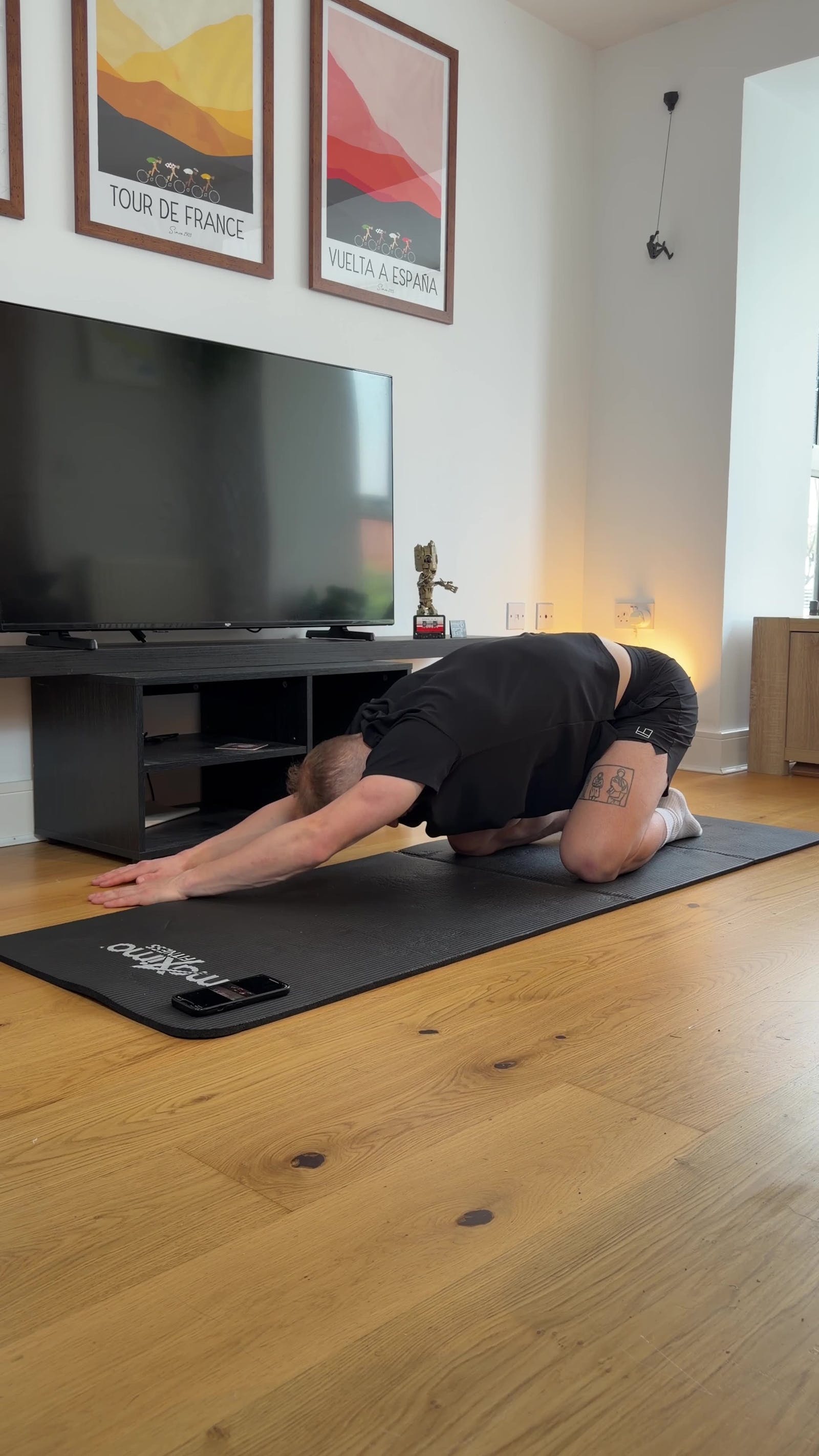
Child's Pose, 2 minutes. Finish folded forward, arms long, breath slow. This is the downregulation piece: the signal to your nervous system that the day's load is done.
Two ground rules. Mild discomfort in a stretch is normal; sharp pain is a stop signal. And this routine is education, not diagnosis: if a specific area consistently hurts, our pain relief hub covers targeted approaches by body area, and persistent or worsening pain belongs in front of a clinician, not a self-management project.
how to choose a mobility app
daily practice or workout support?
Decide what you want the app to be. If you are building a standing habit, daily programming keeps you accountable. If you mainly need warm-ups and cooldowns matched to your training, a workout-support app like MoveWell, or pliability's pre- and post-training sessions, serves you better.
where will you follow it?
Phone-only works fine in a gym corner, but if you stretch in front of the TV, check device support before you subscribe. Several picks here are browser-based, which runs anywhere with a screen, and native apps vary in tablet and TV support.
what does a mobility app cost?
Most of these apps are monthly subscriptions with a meaningful discount for going annual. One-time courses like VAHVA and Cali Move cost more up front and less over the years. GOWOD's free plan and the free trials most apps offer, pliability's included, let you test a routine for a week or two before any money moves. And if a monthly charge is what keeps you showing up, that is a legitimate feature, not a flaw.
mobility apps vs. stretching apps
Stretching apps focus on muscles: lengthening tissue and holding positions to improve flexibility. Mobility apps target joints: how far you can move them with control, especially in dynamic movement. In practice the line matters less than the marketing suggests, because good training uses both. Flexibility gives you range, mobility makes that range usable, and several apps here, pliability and StretchIt included, deliberately blend the two. If your goals lean flexibility-first, our roundups of the best apps for stretching and the best flexibility apps dig deeper.
how often should you use a mobility app?
Daily is fine, and for most people it is the goal. Unlike heavy strength work, gentle mobility training does not demand rest days. Five to ten focused minutes most days beats a single hour on Sunday, and stacking short sessions onto workouts you already do makes the habit nearly automatic.
Give it a few weeks of consistency before judging results. Two or three deliberate sessions per week is a reasonable baseline, building up as your body adapts. Quality beats quantity here: a small range of motion with proper control does more than a big range without it.
make mobility part of the program
The best mobility app is the one you are still using in six months. pliability is built for exactly that: Daily Sessions that give you a fresh guided routine every day, Paths that progress you toward a specific goal over weeks, and Build Your Program when you want the plan shaped around your training. Take the mobility assessment, see what is actually tight, and start with 7 days free on iPhone, iPad, Android, or the web.
Related Reading



Move better in 10 minutes a day.
10,000+ five-star reviews.